
Blog
Data Analysis and Chart Creation

In order to analyze data and create charts, a website will be selected, and based on it the information architecture diagram, a user scenario, and the main user flows will be mapped.
Selected website: https://lipameir.co.il/
1. Information Architecture Diagram
Identification of information items – list
- About the firm
- Who are the team members
- Practice areas of the firm
- Information search via: News & Publications, Facebook, LinkedIn
- Careers
- Contact
- English
Comprehensive list of all information items that make up the system
Home Page:
Main navigation: Logo | About, Team, Practice Areas, News & Publications, Careers, Contact | English, LinkedIn, Facebook
Hero section: Creative visuals (4 branding images), accessibility plugin
About: Short paragraph
Team: “Meet the full team” button
Practice Areas
Rankings: Logos – Top Ranked, The Legal 500, BDI CODE, Dun’s 100, WTR – World Trademark Review
Call to Action: Newsletter subscription
Footer: Terms of Use, Privacy Policy, Accessibility Arrangements, Copyrights
About Page:
Title: About
Button: Download firm profile
Text content
Logos
Sub-navigation: All practice areas
Team Page:
Sub-navigation: All Team, Partners, Attorneys, Interns
Buttons: Search by name, Search by practice area
All Team
108 profiles
On hover: name, role
On click (profile page):
Sub-navigation
Header: Full name, role
Button: Search by name
Text – Practice areas (buttons)
Full-body image
Articles
Partners Page
45 profiles
On hover: name, role
On click (profile page): same structure as above
Attorneys Page
41 profiles
On hover: name, role
On click (profile page): same structure as above
Interns Page
22 profiles
On hover: name, role
On click (profile page): same structure as above
Practice Areas Page:
Practice areas include:
Cooperative Associations, Settlement and Agriculture, Arbitration and Mediation, Insurance, Banking and Finance, Health and Life Sciences, China and Far East Desk, Antitrust and Competition, Privacy Protection and Information Security, High-Tech and Technology, Urban Renewal – TAMA and Evacuation-Building, Insolvency and Debt Arrangements, Telecom and Information Systems Technologies, Litigation and Dispute Resolution, Mergers and Acquisitions, Tenders, Hospitality, E-Commerce and Internet, Labor Law and Employment Relations, Commercial Law, Real Estate, Environment and Climate, Cyber and Artificial Intelligence (AI), International Transactions, Intellectual Property, Defense Industries and Homeland Security, Energy Infrastructure and Project Finance, Investment Funds, Regulation and Administrative Law, Capital Markets and Securities, Corporations and Company Law, Class Actions and Derivative Claims, Automotive Sector, Planning and Construction, Aviation.
Practice Area Subpage (single area):
Sub-navigation: list of practice areas
Button: Search by practice area
Rankings (logos)
News & Publications – “More publications.”
Partners: Full team
Rankings
News & Publications Page:
Filter menu: All, News, Articles, Newsletters, Conferences
Buttons: Search by name, Search by practice area
Content structure:
All: News (articles), Articles (articles), Newsletters (articles), Conferences (articles)
News – articles
Articles – articles: icon, date, title, subtitle, paragraph
Newsletters – articles: icon, date, title, subtitle, paragraph
Conferences – articles: icon, date, title, subtitle, paragraph
Careers Page:
Careers sub-navigation: Attorneys, Interns, Administration
Text content
Attorneys:
Title, text, open position, “Submit CV” button
Interns:
Title, text
Administration:
Title, text, open position
Contact Page:
Address
Contact form
Map
Information extracted from the brief:
| Critical | Important | Nice to Have | Additional Functions |
|---|---|---|---|
| About | Team | Careers | Newsletter subscription |
| Contact | English | Sitemap: Copyrights, Terms of Use, Privacy Policy, Accessibility Arrangements | |
| Practice Areas | News & Publications | ||
| Call to Action | Rankings (logos) | ||
| Site accessibility |
Information Matrix (Preliminary Preparation for the Diagram)
| Level 1 | Level 2 | Level 3 |
|---|---|---|
| Home Page | About | — |
| Team | All Team | |
| Partners | ||
| Attorneys | ||
| Interns | ||
| Practice Areas | Cooperative Associations | |
| Settlement and Agriculture | ||
| Arbitration and Mediation | ||
| Insurance | ||
| Banking and Finance | ||
| Health and Life Sciences | ||
| China & Far East Desk | ||
| Antitrust and Competition | ||
| Privacy Protection & Information Security | ||
| High-Tech and Technology | ||
| Urban Renewal – TAMA & Evacuation-Building | ||
| Insolvency & Debt Arrangements | ||
| Telecom & Information Systems Technologies | ||
| Litigation & Dispute Resolution | ||
| Mergers & Acquisitions | ||
| Tenders | ||
| Hospitality | ||
| E-Commerce & Internet | ||
| Labor Law & Employment Relations | ||
| Commercial Law | ||
| Real Estate | ||
| Environment & Climate | ||
| Cyber & Artificial Intelligence (AI) | ||
| International Transactions | ||
| Intellectual Property | ||
| Defense Industries & Homeland Security | ||
| Energy Infrastructure & Project Finance | ||
| Investment Funds | ||
| Regulation & Administrative Law | ||
| Capital Markets & Securities | ||
| Corporations & Company Law | ||
| Class Actions & Derivative Claims | ||
| Automotive Sector | ||
| Planning & Construction | ||
| Aviation | ||
| News & Publications | All | |
| News | ||
| Articles | ||
| Newsletters | ||
| Conferences | ||
| Careers | Attorneys | |
| Interns | ||
| Administration | ||
| Contact | Address | |
| Contact Form | ||
| Map | ||
| Search / Results Page | Search by Name | — |
| Search by Practice Area | — | |
| Global Navigation | — | |
| — | ||
| English | — |
Information Architecture Diagram
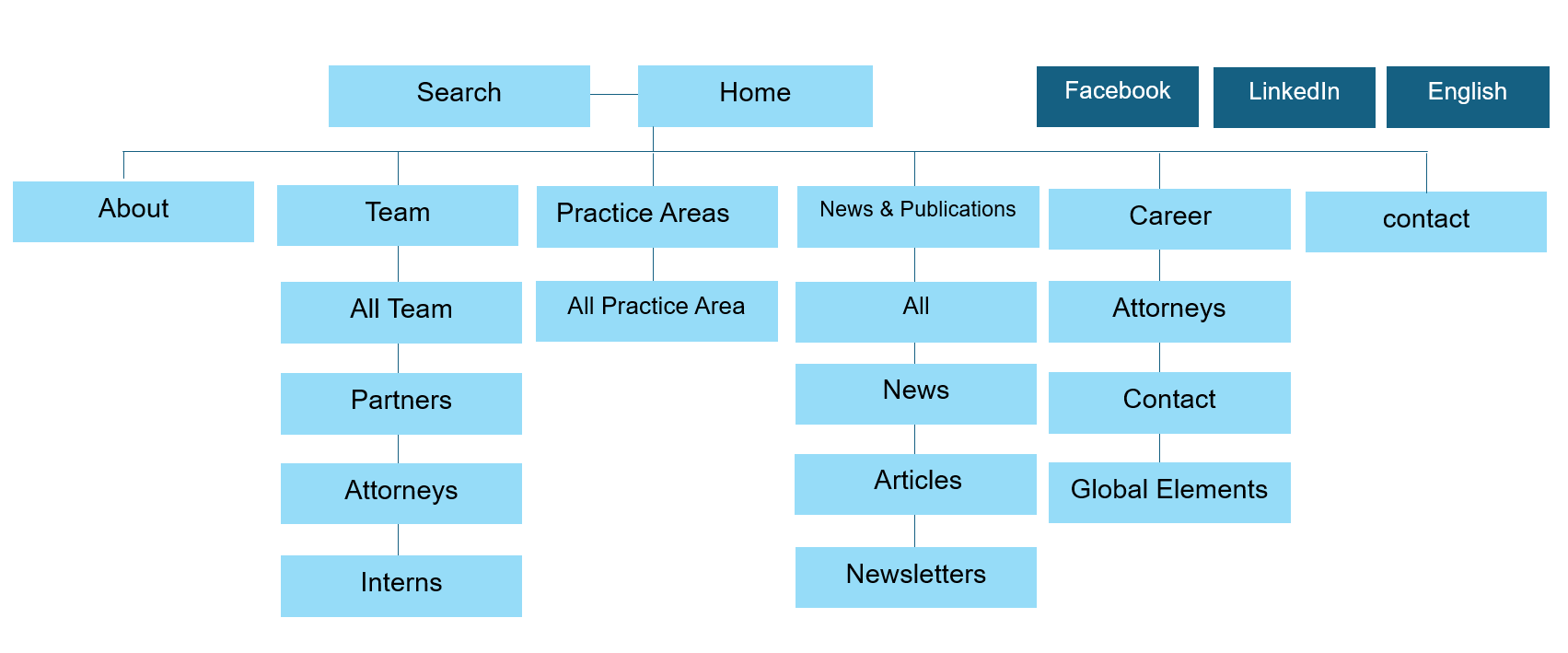
4. User Scenarios
Scenario 1: Emma
Persona: Emma
Context: Recently terminated from her job, Emma needs legal advice and support regarding labor law and employment relations.
Goal: Find a lawyer or senior associate specializing in labor law to consult and possibly accompany her to the hearing.
Website Areas Accessed:
About
Practice Areas
Types of Lawyers / Associates
Actions Performed:
Review the team
Examine specializations
Select the lawyer or associate who will support her
Verify consultation cost
Success Criteria:
Emma successfully books a consultation with a suitable associate at a price she can afford.
Scenario 2: Naama
Persona: Naama
Context: Works at a high-tech company and needs legal support for corporate matters such as company formation, financing, grants, intellectual property, and other business processes. She received a recommendation for Lipameir & Co. Law Firm.
Goal: Find a lawyer specialized in high-tech and corporate law to represent her company in various processes.
Website Areas Accessed:
Practice Areas
Actions Performed:
Review and select a lawyer with the required expertise
Success Criteria:
Naama successfully books a consultation with the lawyer best suited for the company’s needs.
4.1 Critical Scenario in the System
The critical scenario for the website is to enable users to find a suitable team member and successfully book a consultation.
Key User Scenarios:
Emma (individual seeking labor law advice)
Naama are high-priority user flows that must function smoothly to ensure successful outcomes for usersrepresent high-priority user flows that must function smoothly to ensure successful user outcomes.
Main User Scenario
User Story:
Emma needs to find a lawyer specializing in labor law and employment relations. She received a notice from her employer for a hearing and wants to consult with the most suitable and professional lawyer to be fully prepared. If necessary, she wants the lawyer to accompany her to the meeting. She has limited time and needs to find a competent lawyer quickly. Emma considered three lawyers and received a recommendation for Lipameir & Co. Law Firm. Due to budget constraints, she scheduled a consultation with a senior associate from the firm. She found the firm’s website online and booked an appointment.
Key Information Extracted from the Story
- Limited time – urgent need for a lawyer
- Seeks the most professional and suitable legal advice
- Wants lawyer accompaniment for the hearing
- Budget constraints – cannot hire a partner, opted for a senior associate
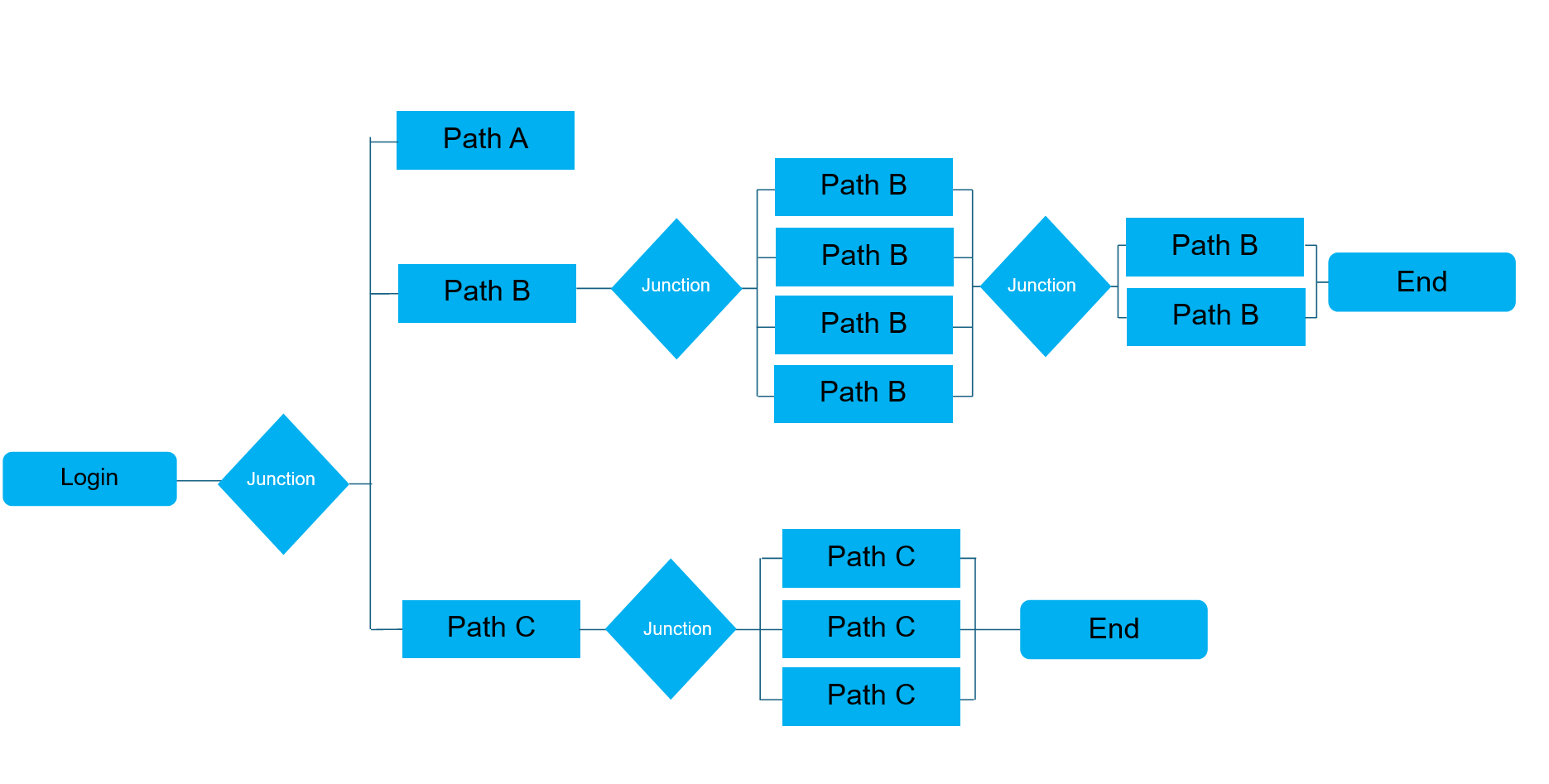
Screens the persona will navigate:

Main User Scenario Flow:
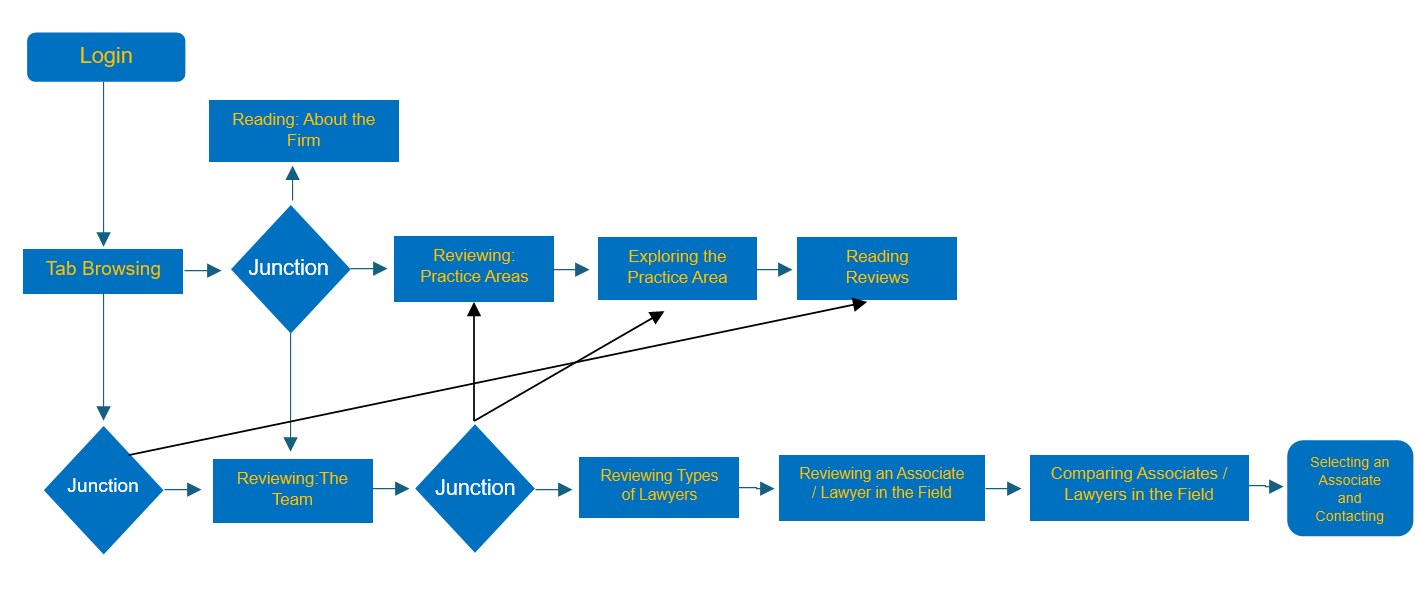
Extracting a User Scenario from the User Story:
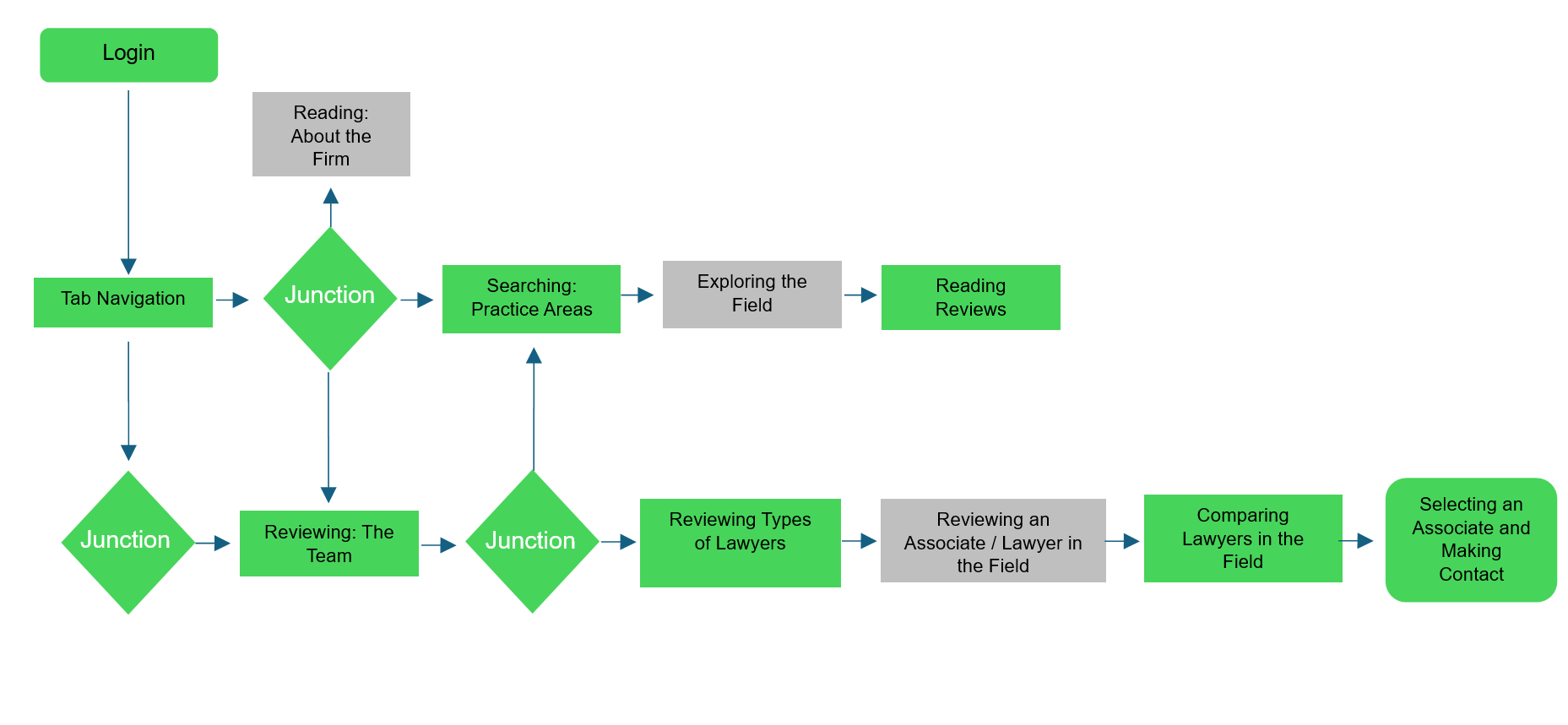
Naama, a friend of Emma, works at a high-tech company, and they are looking for legal support for the company in various processes such as company formation, financing transactions, grants, intellectual property, and similar matters. Naama received a strong recommendation for the firm, so she chose it. All that remains is to select a lawyer who specializes in this field.
Therefore, the scenario will be as follows:
4. Use Scenarios
As Emma, recently terminated from her job,
she wants to find a lawyer or senior associate specializing in labor law to consult and support her through the process.
To do this, she navigates the following areas on the website: About, Practice Areas, and Types of Lawyers / Associates.
She performs the following actions: reviewing the team, examining specializations, selecting the lawyer or associate who will support her, and checking the consultation cost.
Her task is considered successful if she manages to schedule a consultation with a suitable associate at a price she can afford.
As Naama (in contrast to Michal), who works at a high-tech company,
she wants (having received a recommendation for Lipameir & Co. Law Firm and accessing the website directly) to find a lawyer specializing in high-tech companies to support and represent the company in various processes.
To do this, she navigates the Practice Areas section of the website.
She performs the following actions: reviewing and selecting a lawyer.
Her task is considered successful if she manages to schedule a consultation with the appropriate lawyer.
4.1 Critical Scenario in finding a suitable team member and successfully schedulingto find a suitable team member and successfully schedule a consultation.
User Scenarios:
Emma and Naama represent the two types of critical scenarios that may occur (as described above, including their user stories).